
Close Menu
https://freefundas.in
    Facebook X (Twitter) Instagram
    Trending
    • How AI In Smartphone Cameras is Changing In 2026
    • AI in Smartphones: Is It Actually Useful or Just Marketing? (2026 Guide)
    • How Long Do Smartphones Last? When Should You Upgrade? (2026 Guide)
    • What is RAM in Smartphones and How Much Do You Really Need? (2026 Guide)
    • Best Phones Under 30,000 in India (2026) – Which One Should You Actually Buy?
    • When Will Samsung Release the Stable One UI 8.5 Update? Expected Timeline (2026)
    • Android vs iOS: Which Is Better for Everyday Users?
    • How Smartphone Batteries Work (And How to Make Them Last Longer)
    Facebook X (Twitter) Instagram
    https://freefundas.in
    • Home
    • Mobile
      • Android
      • iOS
      • Reviews
    • FreeFundas
      • Tips N Tricks
    • Entertainment
      • OTT
      • Bollywood
      • Hollywood
    • Tech
      • Laptops
      • PCs
      • Gadgets
      • Tech-news
    https://freefundas.in
    Facebook X (Twitter) Instagram
    Home » Tech-news » Galaxy S24 FE Users can access Stable One UI 7.0 via RTL
    Tech-news

    Galaxy S24 FE Users can access Stable One UI 7.0 via RTL

    Anurag ChaubeyBy Anurag ChaubeyJanuary 30, 2025Updated:September 6, 2025No Comments3 Mins Read
    Facebook Twitter Pinterest LinkedIn Tumblr Email
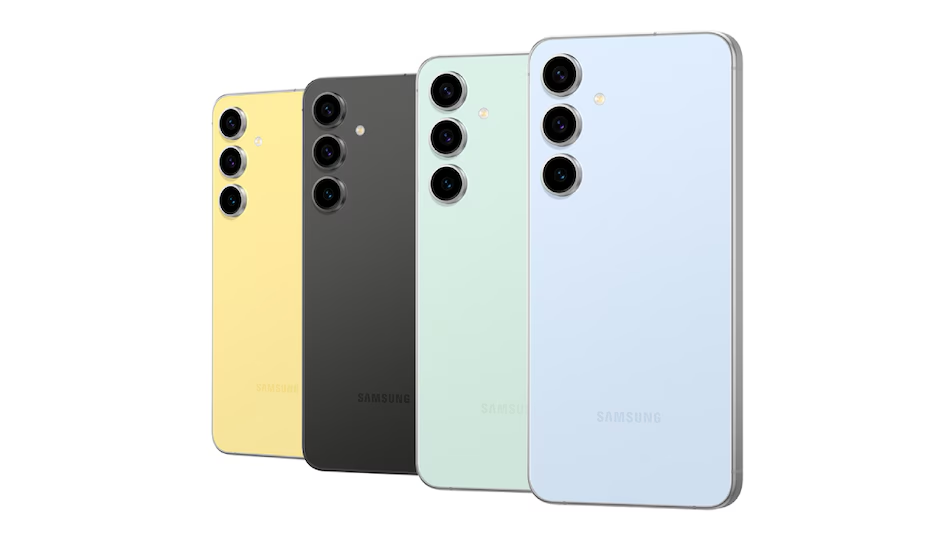
    galaxy_s24_fe
    Photo Credit: Samsung
    Photo Credit-Samsung
    Share
    Facebook Twitter LinkedIn Pinterest Email Tumblr
    Affiliate Disclosure: In obedience to the Federal Trade Commission’s guide (FTC), 
    and to avoid any misinterpretation of our visitors on freefundas.in, 
    it is to inform you that we may earn some commission at no extra cost to you(the visitor)
    when you(the visitor) buy any of the services or products listed on our website like 
    mobile phones, Gadgets, Laptops, etc. from their merchant site.

    Samsung Galaxy S24 FE Users can access Stable One UI 7.0 via RTL (Remote Test Lab)

    Key Points to note
    - The update does not include the Audio Eraser and Now Brief features.
    - Samsung has provided access to the beta version of One UI 7 for several months.
    - Users with a Samsung Account can register to utilize this feature.

    Samsung has unveiled a stable version of One UI 7, which is based on Android 15, in conjunction with the launch of the Galaxy S25 series during its Galaxy Unpacked event earlier this month. This new software is expected to be available soon for older models, including the Galaxy S24 series and Galaxy S24 FE.

    Prior to the public release, users can explore the stable One UI 7.0 on the Galaxy S24 FE through the Remote Test Lab (RTL). This facility is designed for developers to test their applications virtually and remotely on Galaxy devices. Users with a Samsung Account can easily register to access this feature.

    Samsung Galaxy S24 FE Users Can Get a Taste of One UI 7

    Samsung is currently enabling its users to experience the One UI 7.0 stable firmware on their Galaxy S24 FE through the RTL program, as noted by Reddit users. This program, introduced in 2021, allows app developers to remotely connect to actual devices and test their applications across all Galaxy models.

    Individuals with a Samsung Account can register for the RTL to access the Galaxy S24 FE virtually and explore One UI 7.0.

    Screenshots shared by users depict the Galaxy S24 FE operating on One UI 7.0, identified by the build number АРЗА 240905.015 A2 S721BXXU3BYA2, which includes the January 2025 security patch.

    Some users on Reddit have reported that features such as Audio Eraser and Now Brief are absent in this update, and there are also concerns regarding the display of battery health.

    Following the beta access to One UI 7, Samsung has launched the Galaxy S25, Galaxy S25+, and Galaxy S25 Ultra, all equipped with the stable version of One UI 7.

    The South Korean technology leader has yet to provide a timeline for the One UI 7 rollout. However, it is anticipated that previous Galaxy devices eligible for the update will receive it in the first quarter of this year, with the Galaxy S24 series expected to be the first to be upgraded to One UI 7.

    Like this:

    Like Loading…

    Discover more from https://freefundas.in

    Subscribe to get the latest posts sent to your email.

    Android Samsung Samsung Galaxy
    Share. Facebook Twitter Pinterest LinkedIn Tumblr Email
    Anurag Chaubey
    • Website
    • Facebook
    • X (Twitter)
    • Instagram

    Hi Everyone, I am Anurag Chaubey, Chief Editor of this website. I am a Tech-Enthusiast who loves trying new Gadgets and write about them, also I am now learning AI. Apart from blogging I am a Professional Lawyer practicing from over 10 years.

    Related Posts

    How AI In Smartphone Cameras is Changing In 2026

    May 24, 2026

    AI in Smartphones: Is It Actually Useful or Just Marketing? (2026 Guide)

    May 10, 2026

    How Long Do Smartphones Last? When Should You Upgrade? (2026 Guide)

    April 29, 2026
    Leave A Reply Cancel Reply

    Recent Posts

    • How AI In Smartphone Cameras is Changing In 2026
    • AI in Smartphones: Is It Actually Useful or Just Marketing? (2026 Guide)
    • How Long Do Smartphones Last? When Should You Upgrade? (2026 Guide)
    • What is RAM in Smartphones and How Much Do You Really Need? (2026 Guide)
    • Best Phones Under 30,000 in India (2026) – Which One Should You Actually Buy?

    Categories

    • Android
    • Bollywood
    • Gadgets
    • Hollywood
    • iOS
    • Laptops
    • OTT
    • PCs
    • Reviews
    • Tech-news
    • Tips N Tricks

    Archives

    • May 2026
    • April 2026
    • March 2026
    • February 2026
    • January 2026
    • December 2025
    • November 2025
    • October 2025
    • September 2025
    • August 2025
    • July 2025
    • June 2025
    • May 2025
    • April 2025
    • March 2025
    • February 2025
    • January 2025
    © 2026 FreeFundas. Designed by FreeFundas.
    • Privacy
    • Terms
    • About Us
    • Contact Us
    • Disclaimer

    Type above and press Enter to search. Press Esc to cancel.

    Add as a preferred source on Google
    Add as preferred source on Google
    %d